
Know exactly what to buy and sell. Know if you'll have enough.
RangefinderInvest looks at all your accounts as one portfolio, turns the mix you want into a trade list, and tests that same portfolio against your retirement.
Unlike the online planners, nothing of yours goes anywhere. It runs on your own computer. No account linking, no login, no subscription. You buy it once.
On Windows? Get it on Microsoft Store, installed and updated by Microsoft.
Your trade list.
An illustration of the shape of the answer. Work it yourself in example 01 below.
Your odds.
How often the money lasts across 5,000 simulated futures, for a sample couple that ships with the app. Hypothetical, not a forecast.
Two questions. Try them both.
Pick the mix you want. Get the trades.
An illustration: a $100,000 IRA in three funds. Choose a target and the list rewrites itself.
Illustrative mixes, not recommendations, and the arithmetic is simplified: dollar orders, no fees, no price moves. In the app each account follows its own target, mutual funds trade in dollars and ETFs in whole shares, anything inside your drift threshold stays a Hold, and you place every order yourself.
Change one decision. Watch the odds move.
A sample couple, ages 46 and 44, about $475,000 across five accounts. The same 5,000 market futures each time, so only the decision changes.
Nine futures in ten work. One in ten runs short.
Recorded output from the mid-career sample household that ships with the app: taxes, Social Security and required withdrawals included, in today's dollars, on one shared seed. Hypothetical, and not a forecast for you. Load the sample in the trial and you can reproduce it.
No download, no sign-up. A sample couple's five accounts, and nothing is saved.
Download the free trialEvery feature for 30 days, no card. Four sample households are in the app, so you can try all of this before you type in a number of your own.
Ask about your numbers, not investing in general.
Connect Claude, Codex, LM Studio or another assistant, or use the chat page built into the app. It reads your actual holdings and runs the app's own backtests and retirement projections, so the answer comes from your plan and not from a rule of thumb.
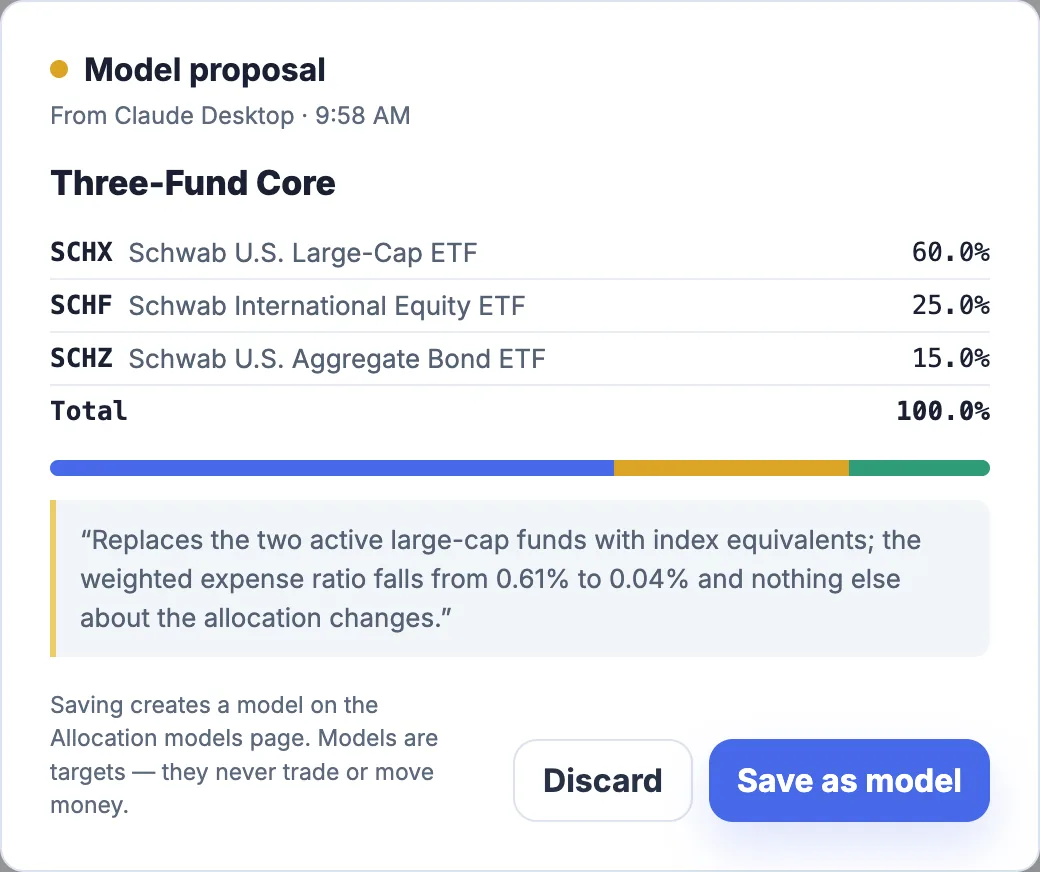
It can propose. Only you can save.
The one thing an assistant can write is a draft target model, shown to you fund by fund. There are no tools to edit holdings, change settings or delete anything, and nothing can place a trade.
Off until you switch it on.
Three switches decide what it may do: read, calculate, propose. Every call it makes is listed in the app as it happens.
It can stay on your machine.
Point it at a model running on your own computer and nothing about your portfolio leaves it. A hosted assistant sees the context and results it reads, under its own terms.
Less spreadsheet work. More understanding.
Several accounts. One portfolio.
Every account at every brokerage, added up: what you hold, what it is worth, and how much is really in stocks, bonds and cash.
- Fidelity and Schwab file import, or month-end statement entry
- Your true return, with your own deposits stripped out
- Cost basis, gains, bonds and CDs included

A target you designed on purpose.
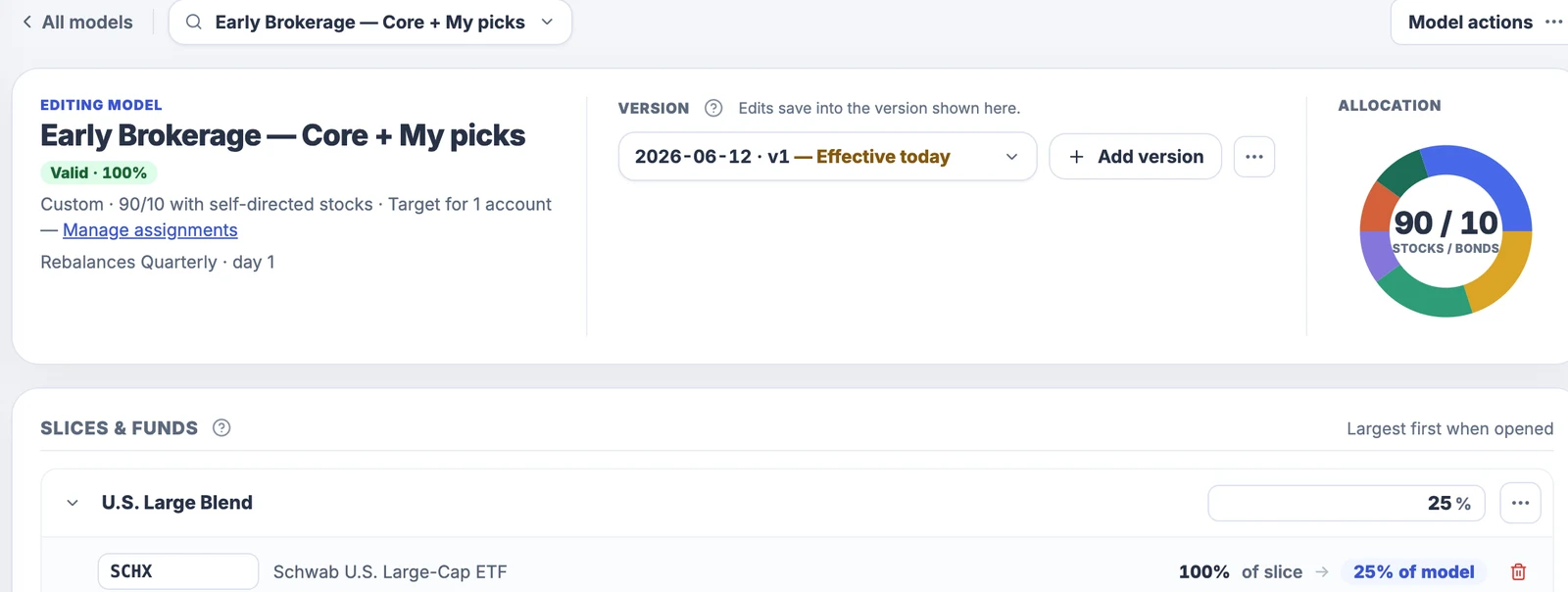
Build the mix as slices and the funds that fill them, or start from what you already hold. Different accounts can follow different targets.
- Your own stock picks stay one basket
- Change the target later and the history replays the change
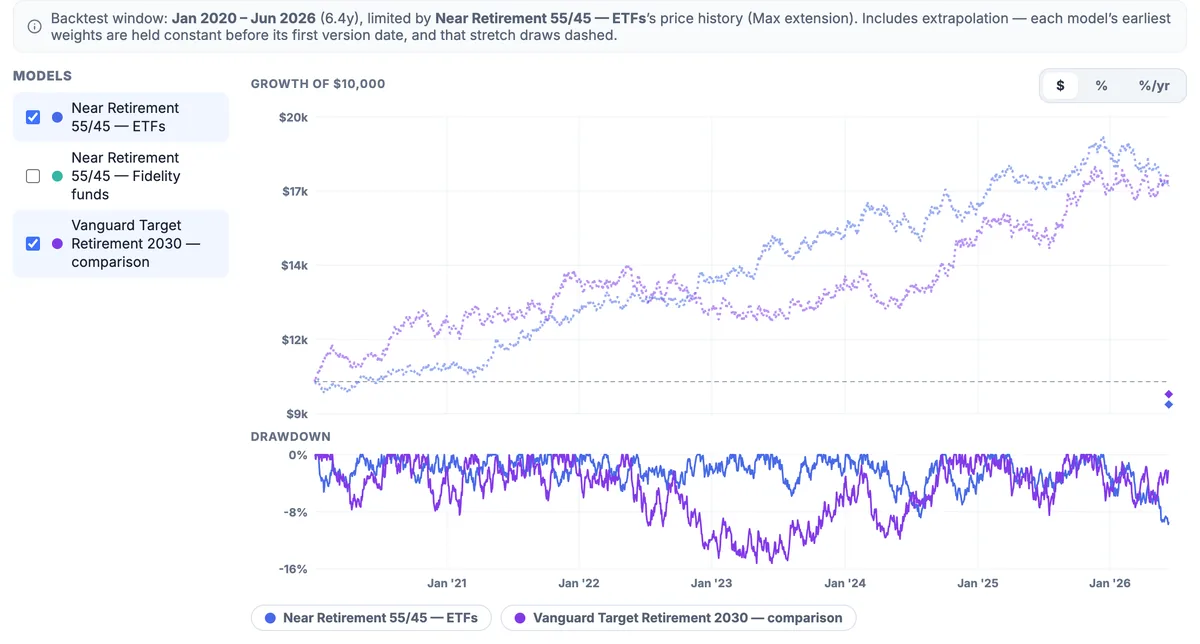
- Backtest mixes side by side: growth and worst drops
Is there a better fund for this slot?
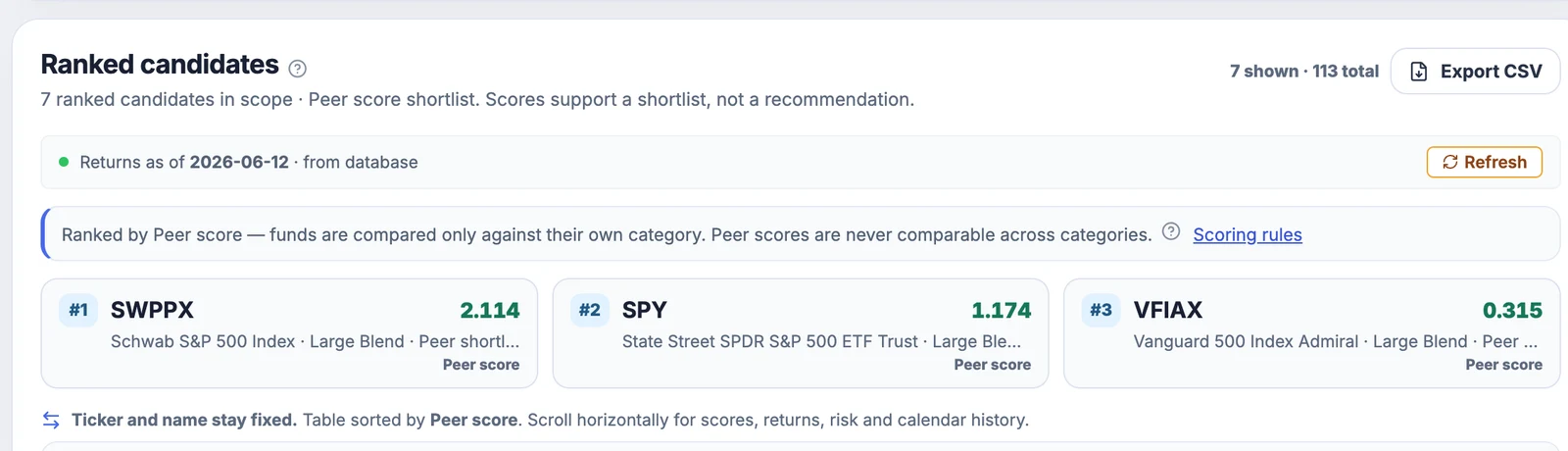
Rank the funds in each category on risk-adjusted results, let the optimizer propose swaps, and check the whole model on data the search never saw.
- Short track records are pulled toward the category average
- A shortlist to research, not a recommendation
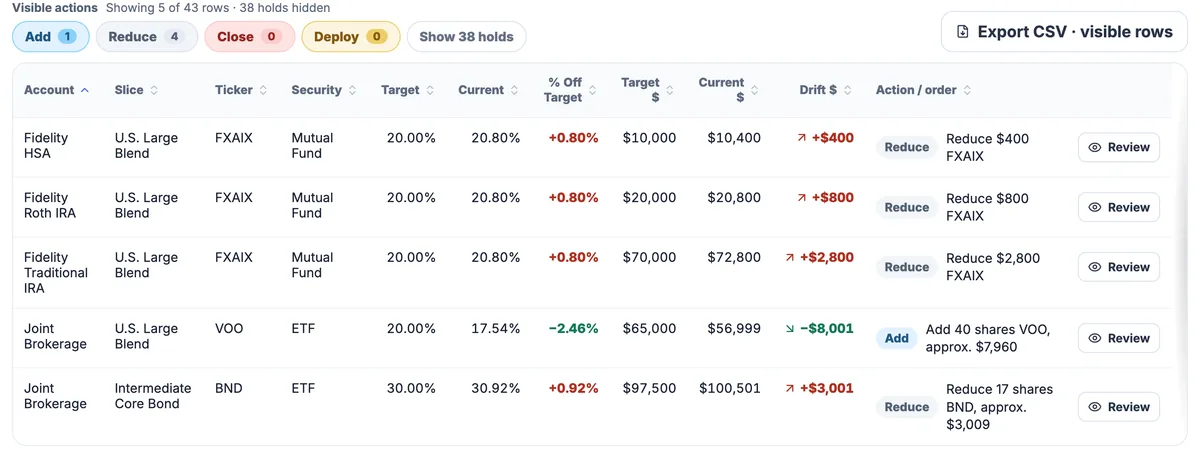
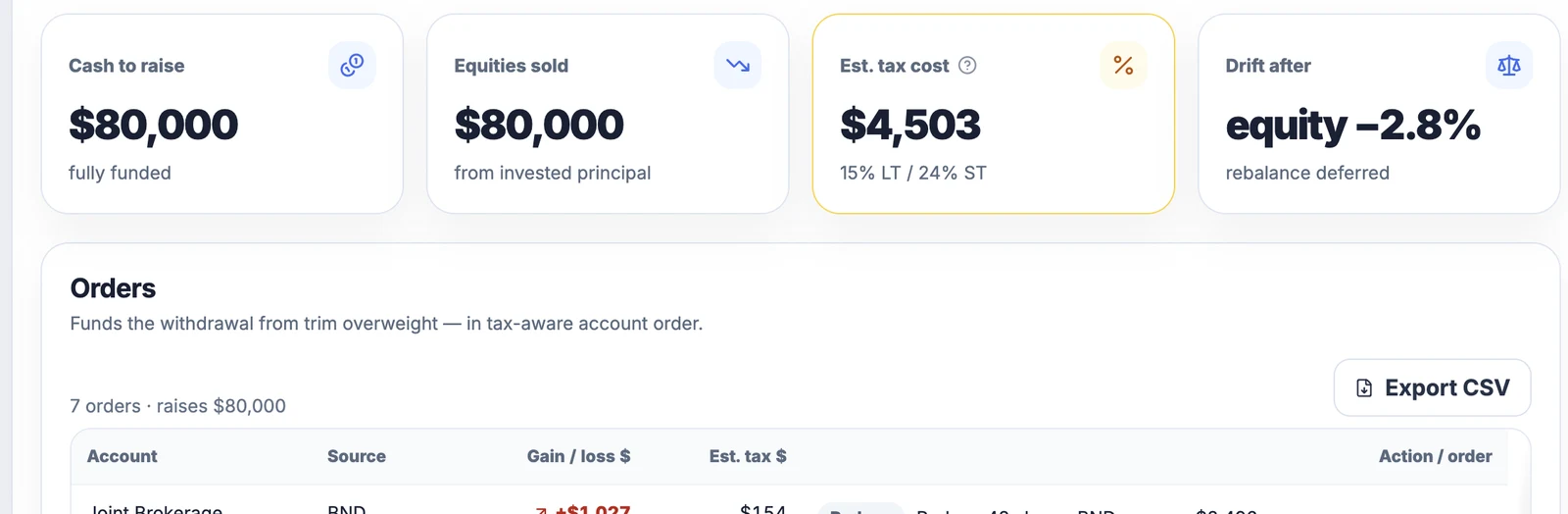
Exact orders, in and out.
Rebalance, put new cash to work, or raise cash for a withdrawal. Each comes back as a list per account, with the estimated tax.
- Taxable first, then tax-deferred, then Roth
- Lot-level gains and wash-sale flags across all accounts
- Export the list and take it to your broker
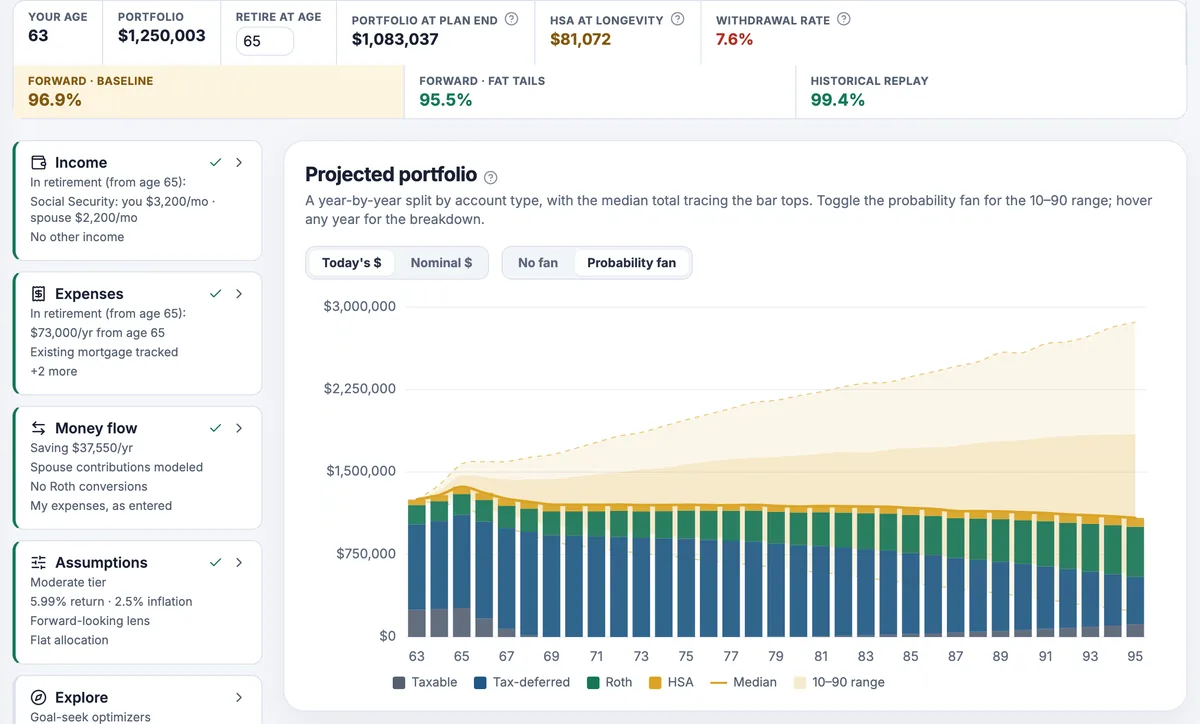
The plan that portfolio has to carry.
Your whole household, year by year, in today's dollars: spending, Social Security, required withdrawals and real federal tax.
- Retirement-age and Roth-conversion searches
- Spending rules with their cost shown
- A survivor what-if and a Social Security cut you can switch on
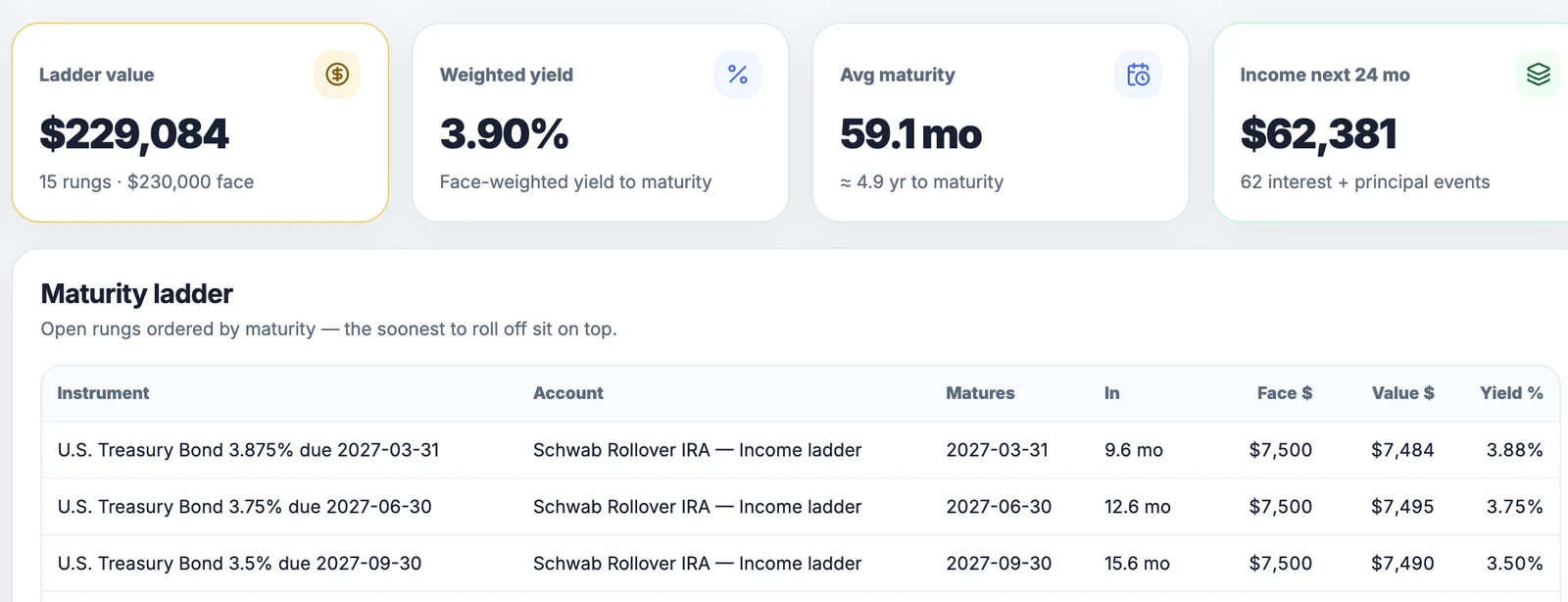
Treasuries and your TSP, in the same plan.
T-bills and brokered CDs tracked by yield, accrual and maturity. All 16 TSP funds with official tsp.gov prices back to 2003.
- Build a ladder from the current Treasury curve
- TSP sits beside your brokerage accounts, tracked and projected
If you keep asking yourself these, this is what it's for.
Your portfolio, today
- What do I actually own?Every account added up into one picture.
- How am I really doing?Your true return, with your own deposits stripped out.
- What mix should I be aiming for?Compare mixes on history and on your retirement odds. It shows the evidence; you choose.
- Which funds and ETFs should fill it?Ranked within their category, swaps tested before you make them.
- What do I do to stay on target?An exact order list, account by account, whether you are adding money or taking it out.
Your retirement
- When can I retire?The earliest age where the plan still holds.
- Will my money last?5,000 futures, with taxes, Social Security and required withdrawals included.
- How much can I spend this year?A yearly check-in against your real balances.
- Should I convert to Roth, and how much?Tested against brackets, Medicare and health-subsidy cliffs.
- What happens to the one of us who is left?A survivor what-if, taxes and benefits included.
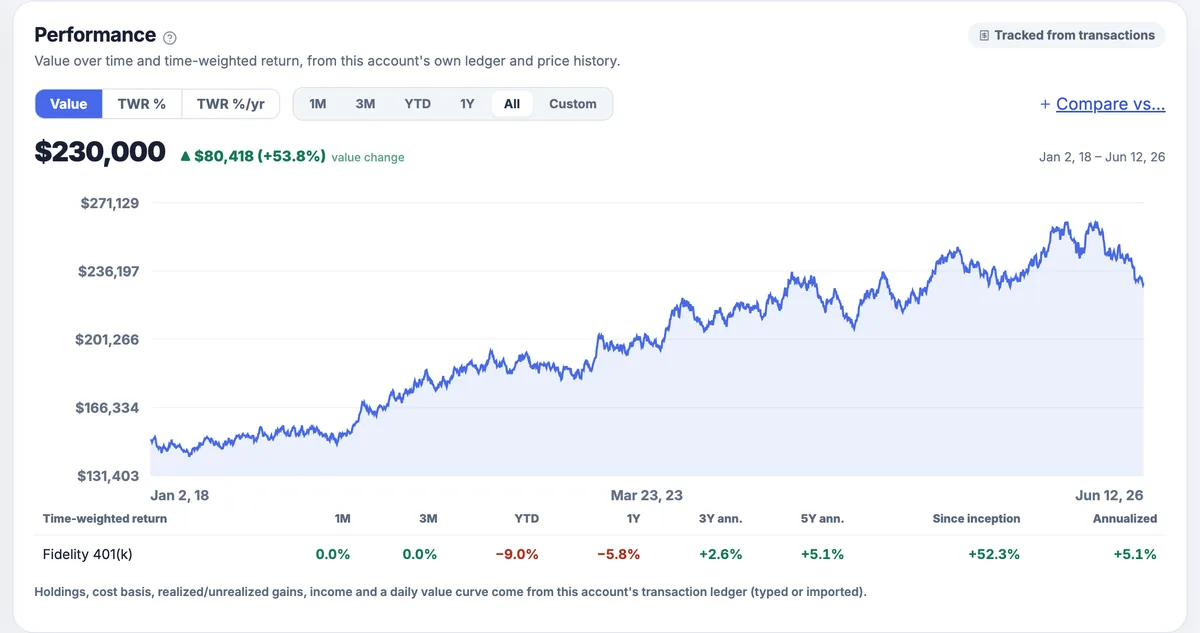
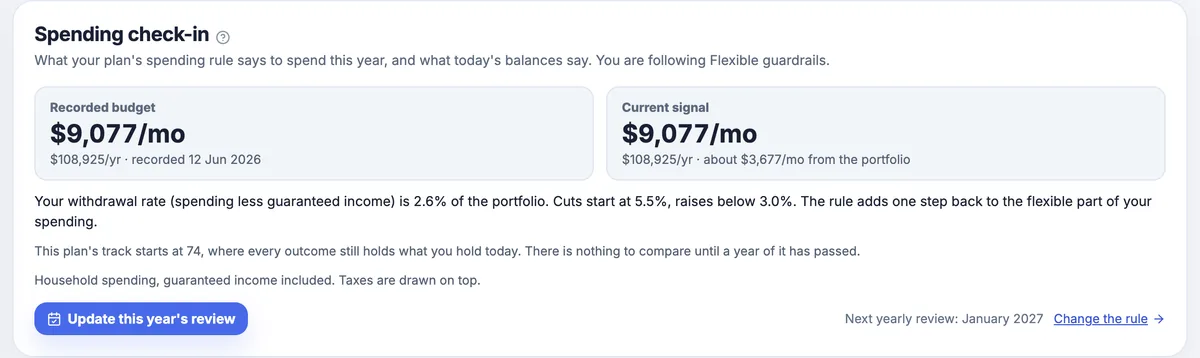
Twelve more questions it answers
Which account should I draw from first?
Taxable, then tax-deferred, then Roth by default. Change the order and see what it does to lifetime tax.
Should I cut back in a bad market?
Compare fixed spending, guardrails, and spending a share of the portfolio, each with its cost.
What will required withdrawals do to my taxes?
RMDs worked out per person, year by year, with and without conversions.
What if Social Security gets cut?
Switch on a benefit cut from a year you choose. Each spouse also gets their own claiming age.
We are not retiring at the same time.
Each earner has their own salary, savings and retirement age, so the in-between years are modeled.
How do we cover health insurance before 65?
Your marketplace premium and subsidy, checked against the income limit every year.
Can we afford the house?
Put a purchase into the plan, find the most expensive home it still supports, and price paying the mortgage down early.
Am I too concentrated in one stock?
Individual stocks are added up across accounts and flagged when one passes the share you set.
How do I build a T-bill or CD ladder?
Set the amount, rungs and spacing; it prices the ladder off the current Treasury curve, then tracks what you bought.
Can it handle my TSP?
All 16 TSP funds with official tsp.gov prices, tracked and projected beside your other accounts.
How sure is that answer?
Every plan is scored three ways: a forward model, the same model with harsher crashes, and a replay of market history.
What if I change something else?
Retire later, save more, spend less. Change one thing and compare both outcomes on the same market paths.
Every picture is a sample household that ships with the app. RangefinderInvest is a calculator for a plan you design, not advice, and projections are hypothetical.
Four things it will never do.
Log in to your brokerage
File import and manual entry only. No credentials to leak, nothing linked.
Place a trade
It writes the list. You review it and place every order at your own broker.
Keep your data on our servers
One file on your computer with automatic local backups. Move it, copy it, delete it.
Pick investments for you
It compares on evidence and does the arithmetic. A calculator for your plan, not advice.
It goes online for two things, fund prices and checking for updates, and you can turn both off. Optional AI is off until you enable it. Every network path, in full →
Buy it once. Keep it.
The app runs on your machine and your plan lives in a file you own. Renting you access to your own retirement plan would miss the point.
The advisor figure is arithmetic, not a quote. You still make your own decisions here.
What happens when the trial ends?
The app stays open read-only. You can still see, export, back up and restore everything. A license turns editing back on.
What happens after the first year?
Your license never expires and every version released in your 12 months keeps working. Another year of new versions is an optional $49, and it never renews on its own.
How much can I rely on the projection?
It is an estimate built on your assumptions, not a guarantee. The tax model covers federal ordinary-income brackets and a flat state rate. It leaves out preferential capital-gains rates, NIIT and itemized deductions, and says so on the panel.
Do I need to pay for price data?
No. The default source is Tiingo with your own free key; TSP prices come from tsp.gov; an optional Yahoo Finance source is off by default. The bundled samples work before you set any of it up.
Who is it not for?
Anyone who wants accounts to sync automatically, wants to be told which stocks to buy, wants trades placed for them, or needs a phone app. The retirement model assumes the US tax system.
- 30-day free trial, every feature, no card
- 12 months of updates included
- License never expires, verified offline
- 30 days to change your mind
Sold to US customers with a US billing address. US only · terms & refunds
Go as deep as you like.
A real example with numbers: Roth conversions, and retiring at 62 or 65
Same household, same 5,000 market paths, same seed, so the only thing that moves the answer is the decision that changed.
Should we convert to Roth before RMDs start?
| No conversions | Fill the bracket | |
|---|---|---|
| Median lifetime tax | $197,281 | $184,813 |
| Median lifetime RMDs | $828,762 | $0 |
| Futures that fund everything | 96.9% | 95.3% |
Can we both retire at 62, or does it have to be 65?
| Retire at 62 | Retire at 65 | |
|---|---|---|
| Futures that fund everything | 90.8% | 99.3% |
| Median ending balance | $1.810M | $3.051M |
| What changed | Only the two retirement dates | |
Both pictures below come from the same near-retirement sample and the same sample date as the Roth table above. Read them together with one thing in mind: the table’s two columns are the saved scenarios that sample ships with, while the optimizer sweeps fixed fill levels. That is why its “No conversion” row reproduces the table’s first column exactly and its other rows do not match the second one: “Fill the bracket” is not one of the levels swept.
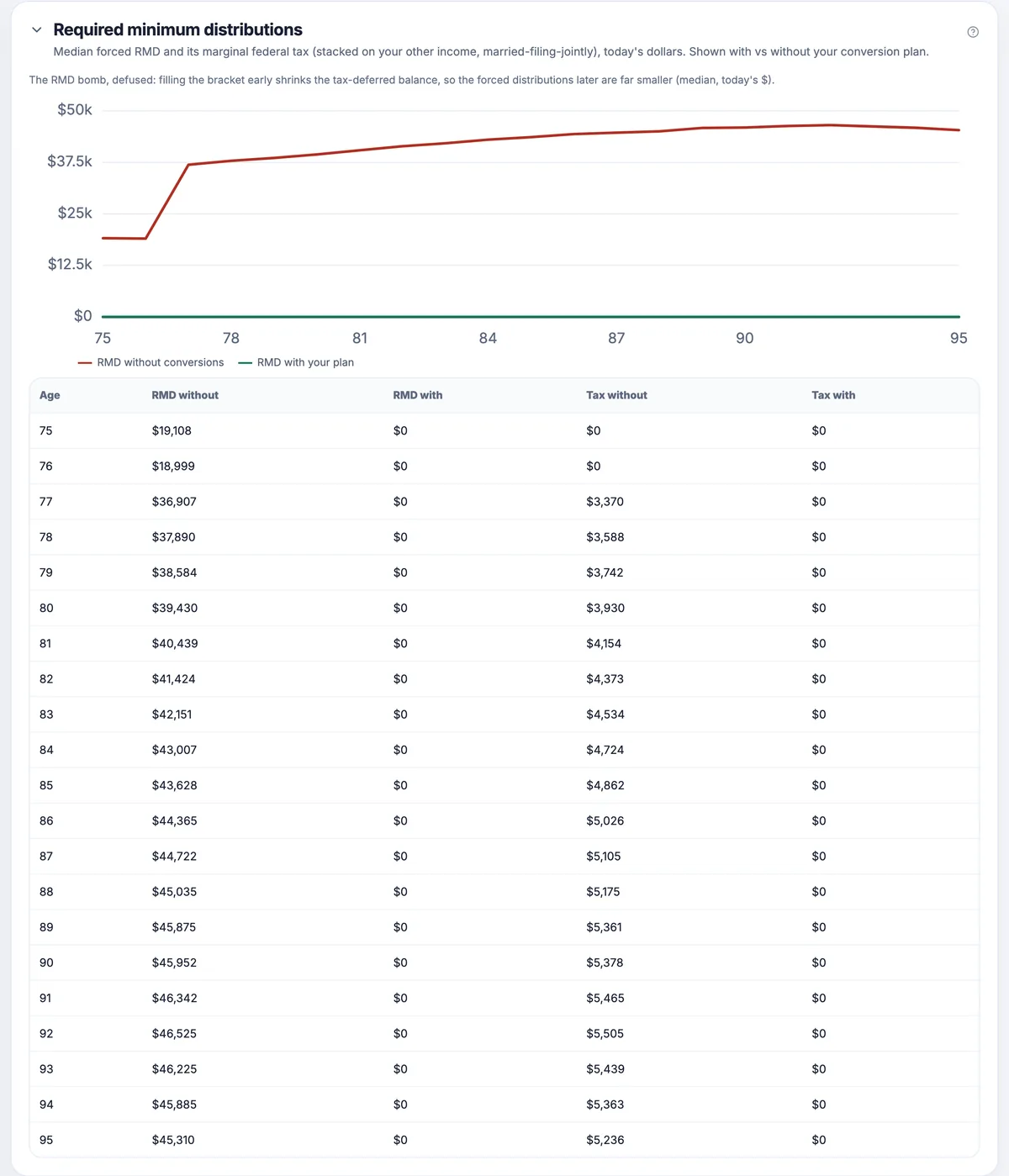
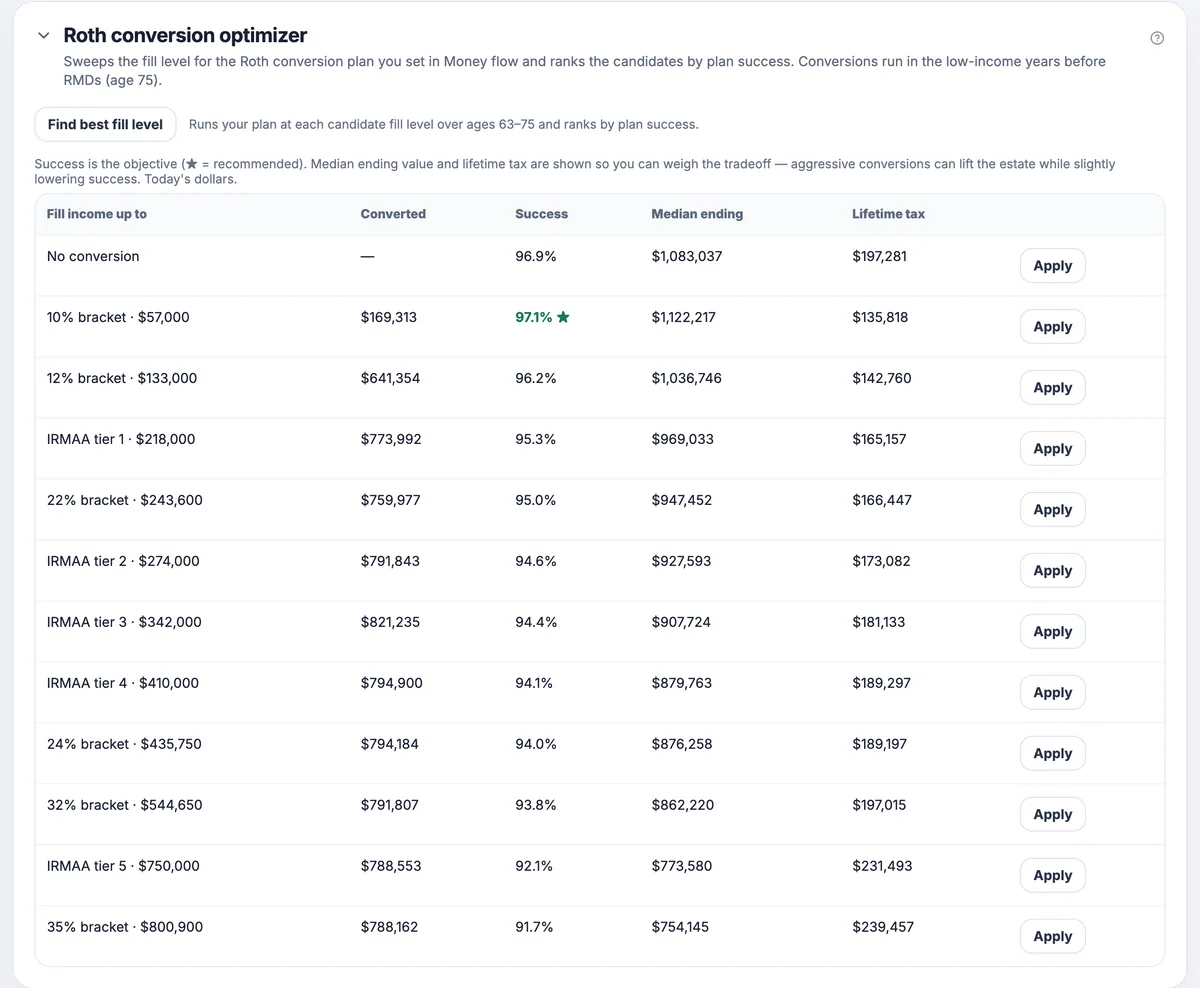
Fictional sample households, today's dollars, forward baseline model, shared seed, sample date June 12, 2026. Not a forecast for you; load either sample in the trial to reproduce the run.
TSP, Treasuries and several models at once
All 16 TSP funds, officially priced
Daily share prices from tsp.gov, back to 2003. Your TSP sits beside your brokerage accounts: tracked, backtested and projected. Balances are entered by you; there is no TSP account connection.
A real Treasury and CD ladder
T-bills and brokered CDs tracked by yield, accrual and maturity. The in-retirement sample carries a $230,000, 15-rung ladder.
Several accounts, several models
A 401(k) with a short fund menu and a brokerage account do not need the same model. Each follows its own; the household view adds them up.
How the trades are worked out
Mutual funds in dollars, ETFs in whole shares. Anything inside your drift threshold stays a Hold, so noise never becomes churn. New cash gets a buy-only plan that fills the biggest gaps first. Withdrawals draw taxable first, then tax-deferred, then Roth, with lot-level gains, HIFO or FIFO, and wash-sale flags checked across all your accounts. Your own stock picks stay one basket, never a liquidation list.
How the retirement math is worked out
A seeded simulation of the whole household in today's dollars, from your real balances split by tax treatment: federal brackets, the Social Security worksheet, ACA and IRMAA ceilings, per-owner RMDs, an HSA drawn first for medical costs, survivorship, a home purchase, and spending rules with their cost shown. Scored three ways: a forward model, the same model with harsher crashes, and a replay of market history. Re-running gives the same result, and every simplification is stated on the panel it affects.
What touches the network
Price lookups carry ticker symbols. The update check carries the app version and operating system, and it can be switched off. AI is off until you enable it, and a hosted provider then receives the context used for that request.
Download RangefinderInvest
The full app, free for 30 days, on your machine. Import your accounts, see your real numbers, run your own plan. When the trial ends your data stays yours (the app goes read-only), and a one-time license unlocks it for good.
macOS
macOS 13 or later · Apple silicon · 209 MB
Download .dmgSigned and notarized by Apple, so it opens with no Gatekeeper warning. Drag it to Applications and go.
SHA-256 · .dmg44a4b3c1496a8c6f3e7fb749feecc276a1d404f02843ff1836f9e2499793e4fd
Windows
Windows 10 or 11 · 64-bit · Store version 0.40.2
Get it from theMicrosoft StoreMicrosoft signs and delivers the Store build, so it installs with no security warning and keeps itself updated. On Windows this opens the Store app straight to the listing; press Get. If nothing opens, this PC hasn't got the Store (some Windows installs don't), so take the direct installer below instead.
Or get the current direct release 0.58.0 (.exe, 195 MB)The direct .exe triggers a security warning, sometimes two. Here's why, and what to do.
Windows SmartScreen and Chrome's equivalent flag installers they haven't seen downloaded many times yet. It's a measure of how well known a file is, not whether it's safe. Every new independent app starts at zero and earns its way out.
Depending on your browser and Windows settings you'll meet one of these, sometimes both:
- Downloading: the browser says the file "isn't commonly downloaded". In Edge, the way through is hidden twice over: open the … menu beside the file in the downloads list and choose Keep, then, if a second box appears whose big button says Delete, click the ˅ on that button and choose Keep anyway. Deleting is the prominent option, not the correct one.
- Opening it: if Windows shows "Windows protected your PC", click More info, then Run anyway. You may not see this one at all.
Either box may also list the publisher as Unknown; the SHA-256 below is how you check the file you got.
Prefer to skip it entirely? Use the Microsoft Store button above. Microsoft re-signs that build, so there's no warning at all. If you reach the Store listing in a browser instead, click its View in Store button rather than Download: the web page's Download button gives you a small Microsoft-made helper .exe, which is new enough to draw the same unrecognized-file warning. Either way you can confirm you got the exact file we published by checking the SHA-256 below.
SHA-256 · .exebbbc9485616f9717a566f5b3f8ea6b575029b92d337e5e58e36d1cca24dc6671
Windows 10 or 11 · 64-bit · Direct release 0.58.0
Download .exeThe Microsoft Store listing isn't available from this page right now, but the current Windows installer is. The direct .exe may trigger a SmartScreen warning. If you need help installing it, contact support.
Linux
64-bit · Debian/Ubuntu · 217 MB
Download .debUnsigned, like most direct Linux downloads. Your software centre may say "not from a verified source". Installing from a terminal skips that and sets the sandbox up correctly (steps below).
Other distributions (.AppImage, 254 MB)SHA-256 · .debacfb29cff81cdef746209d6fd6510fed94fe83f5fe433ecac11e77277d29fa1f
Direct release 0.58.0. The Microsoft Store currently carries 0.40.2. Verify any direct download against the published SHA-256 checksums. On macOS or Linux, use shasum -a 256 <file>. Ready to keep it? Get a one-time license including 12 months of updates. See pricing, or buy it now.
Installing on Linux +
Ubuntu, Debian and derivatives: use the .deb. Installing from a terminal is the smoothest path: it skips the software-center "not from a verified source" warning (that's just a flag for any direct download, not a problem with the app) and sets up the sandbox correctly:
cd ~/Downloads
sudo apt install ./RangefinderInvest-*.deb
You can double-click it instead and click Install past the warning for the same result.
Other distributions (Fedora, Arch, openSUSE…): use the AppImage. Download it, mark it executable and run it:
chmod +x RangefinderInvest-*.AppImage
./RangefinderInvest-*.AppImage
Download the AppImage. It needs FUSE (sudo apt install libfuse2t64 on Debian/Ubuntu, or your distro's equivalent). On Ubuntu 23.10+ we recommend the .deb instead. Recent Ubuntu blocks the sandbox an AppImage relies on, so the .deb is the reliable choice there.
Know your distance.
See what you own, close the gap toward the mix you chose, and measure the distance to retirement and through it. All on your own machine, all yours to keep.
A one-time license including 12 months of updates, with a 30-day free trial and 30 days to change your mind (refund terms). macOS, Windows and Linux all available now.
Made by Kalman Software. Local-first, pay once.