
Federal employees
Your Thrift Savings Plan, in the same plan as everything else
The TSP is usually the largest account a federal household owns and the one most planning tools handle worst: either left out entirely or approximated with a substitute ETF that doesn't behave like the fund it's standing in for. RangefinderInvest prices the actual funds, from the actual source, and puts the TSP beside your IRAs and taxable accounts as one portfolio.
The short version: one click downloads the official daily share prices for all 16 TSP funds, including G, F, C, S, I and every Lifecycle fund, straight from tsp.gov, with the core series going back to 2003. Your TSP then behaves like any other account in the app: real holdings, real drift against your target, real backtests, and a place in the retirement projection. Prices are automatic; you enter your balances yourself. There is no login and no linked account.
All 16 funds, priced from the source
The five core funds carry daily prices back to May 2003. The Lifecycle funds start when each one actually launched. A fund that didn't exist yet is recorded as having no price that day, never as a zero.
These are the official published share prices, not proxies. That distinction does real work: TSP funds are accumulation NAVs. They don't distribute; income is rolled into the share price, so the published series is the total-return series. Nothing has to be reconstructed from dividends, and nothing drifts away from what your statement says.
Why the G Fund is the reason to do this properly. The G Fund doesn't behave like a bond fund or like cash, and substituting either one changes the risk profile of your entire plan. In the official price series, across 5,765 consecutive daily transitions since 2003, it never once went down. Model it with a short-Treasury ETF and you have imported volatility and drawdown the real fund did not have; model it as cash and you have thrown away the yield that makes it worth holding. Neither approximation is close enough to plan a retirement on.
That figure is a description of the published record, not a promise about the future.
it's exactly the kind of claim you should check yourself, and you can: the file is public
at tsp.gov/data/fund-price-history.csv, which is the same one the app reads.
What happens once your TSP is in there
Nothing about the TSP is a special case after import. It's an account with a tax treatment and a target allocation, so every part of the app applies to it:
- One picture. Your real asset allocation across the whole household, including TSP, 401(k), IRAs, Roth, HSA and taxable, rather than five separate pie charts you mentally add up.
- Drift against a target you chose. Build a model out of the TSP funds themselves, or a household-wide model where the TSP fills the slices it's best at, and see exactly how far off you've drifted. You make the change with an interfund transfer on tsp.gov yourself. The app is telling you what to do, never doing it.
- Backtests on real history. Because the price history is genuine and goes back to 2003, a model containing TSP funds backtests on real prices, with the app naming the true common window rather than quietly truncating it.
- The retirement projection. Your TSP balance is part of the Monte Carlo like every other account: split by tax treatment, subject to RMDs on the owner's own birth year, drawn down in whatever order your withdrawal sequencing says.
- Roth-conversion analysis that accounts for the tax-deferred balance actually sitting in the TSP, rather than pretending it's all in an IRA.
The decision this actually helps with
Pricing the funds is the plumbing. The question a federal employee actually faces is simpler and harder: take the one-fund Lifecycle default, or pick your own C/S/I/F/G mix? Both sides of that ship as target models in the bundled samples, so you can look at the comparison before you own anything.
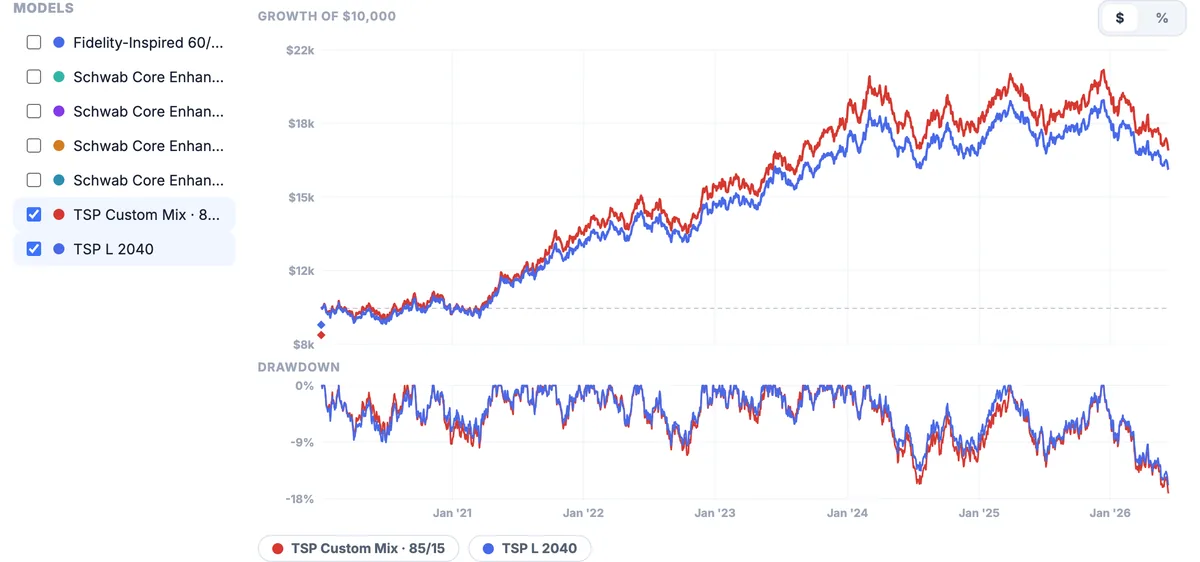
The decision belongs to the mid-career sample household: age 45, retiring at 61 in 2042, which is the year TSP's own selection rule points at L 2040. Against it sits a self-picked 85/15 mix (C 55 / S 20 / I 10 / F 5 / G 10) with more equity than the L fund, and about a quarter of its International exposure.
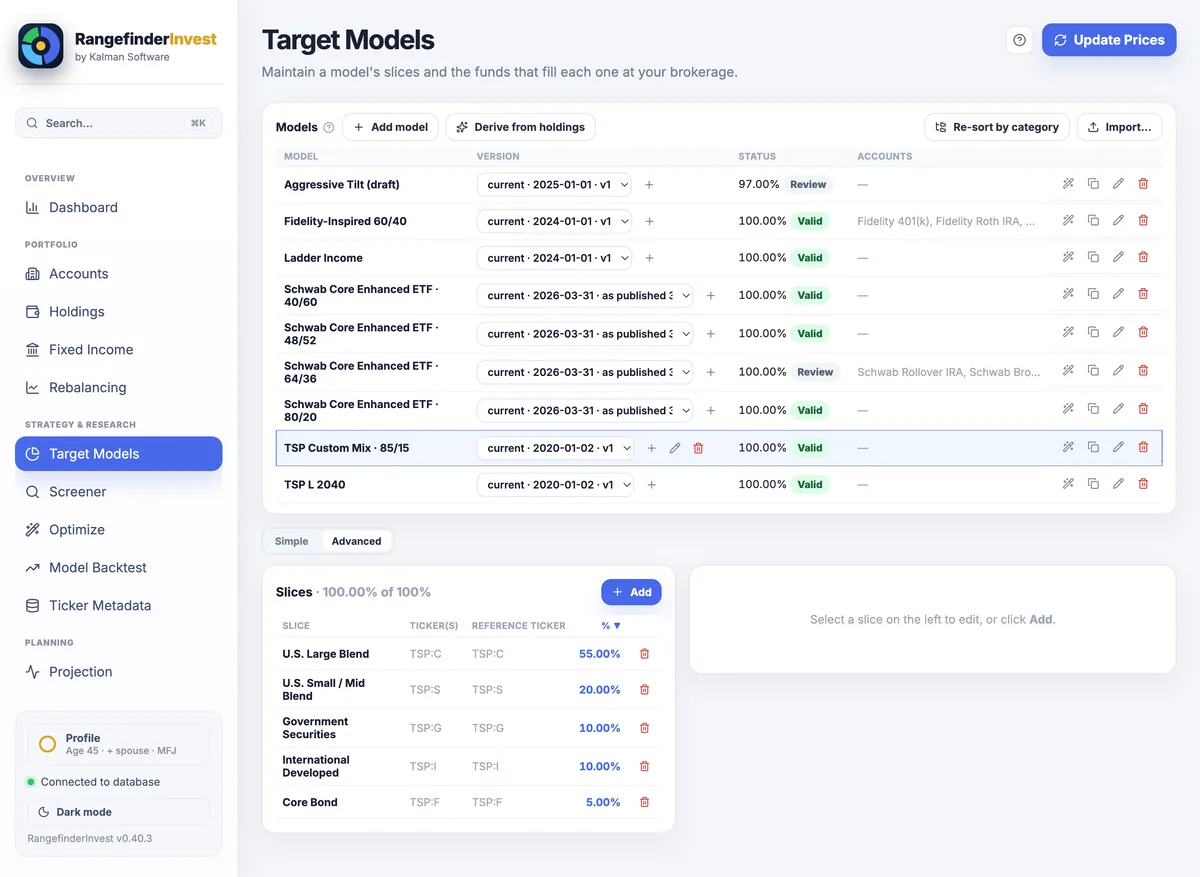
TSP: prefix is why the C Fund can't be confused with Citigroup.Put the two models side by side on Model Backtest and you get the shape of the trade rather than a verdict. The heavier-equity mix finishes ahead over this window, and pays for it in exactly the places you'd expect: a higher volatility figure, a deeper maximum drawdown, and a worse average down month. Whether that's worth it is yours to decide; the tearsheet's job is to price it.
What it does not do
Automatic
- Fund prices. One click, all 16 funds, full official history, and refreshed through the normal "update prices" flow afterwards.
- The math. Allocation, drift, backtests, projections, RMDs, conversion analysis.
Yours to do
- Entering your balances. No connection to your TSP account exists. Access there is login and MFA, and adding an aggregator would break the local-only design this app is built on.
- Executing changes. Interfund transfers and contribution allocations happen on tsp.gov.
- Contribution modeling: payroll contributions and allocation changes are not modeled.
- Deciding whether to roll out. The projection will run whatever scenarios you build, but there is no guided stay-versus-roll tool.
It updates the prices; you enter the balances. If you were hoping for something that logs into your TSP account and syncs, this isn't it. Nothing in the app links to a brokerage.
Your TSP record stays on your machine
Your balances, your accounts, your models and your plans live in one SQLite file on your own computer. There is no account and no server holding a copy.
The TSP price fetch is one public HTTPS request to tsp.gov for a file anyone can download; it carries nothing about you. Outside optional AI access, the only other outbound request is a daily update check, and both can be switched off. The optional AI tools are off until you enable them; a fully local provider is available. The privacy policy lists every network path field by field.
Questions
Do I need an API key or a tsp.gov login?
Neither. The price file is public and needs no authentication. Your own TSP login is never involved, because the app never touches your account.
How do my balances get in, exactly?
You enter them the same way any account without a supported CSV export goes in. Since the app then holds real share counts against real daily prices, the value tracks itself between updates rather than needing to be re-typed.
Can I model my TSP against my IRA to compare them?
Yes. That's the normal case, not a special mode. Each account carries its own target model and its own tax treatment, and the backtest can put models side by side with a benchmark. What it won't do is tell you which to choose.
Is this affiliated with the TSP or my agency?
No. RangefinderInvest is independent software from Kalman Software LLC. It reads a public price file published by the TSP; there is no other affiliation.
Can I try it before paying?
For 30 days you get every feature with no card and no account. Then it stays open read-only. Four sample households ship with the app if you'd rather look around before entering anything.
Put the TSP on the same screen as everything else
Download it, add the TSP funds, and see your real household allocation before you decide anything.
macOS, Windows and Linux. Your data stays in a file on your own machine.
The Thrift Savings Plan is administered by the Federal Retirement Thrift Investment Board. Kalman Software LLC is an independent company and is not affiliated with, endorsed by, or sponsored by the FRTIB, the TSP, or any United States government agency. "Thrift Savings Plan," "TSP" and the fund names are used only to identify the funds this software can price, using a price file the TSP publishes publicly; that file and its format are theirs to change. Statements about the historical price series describe the published record and are not predictions. Past behavior of any fund, including the G Fund, does not guarantee future results.
Related:
portfolio rebalancing software ·
retirement planning software
without a subscription ·
a private alternative to Empower / Personal
Capital
From the built-in help: where prices come from · import a broker CSV · getting started · funds with no ticker symbol · the Holdings page · the Accounts page · how suggested trades are computed